Product Demo Videos: A Step-by-Step Creation Guide
Demo video creation is a powerful tool for non-profits and mission-driven organizations aiming to expand their reach and impact. By creating visually compelling and informative demo videos, these organizations can clearly communicate their mission and showcase their stories in an engaging way. This not only educates their audience but also builds a sense of connection and trust.
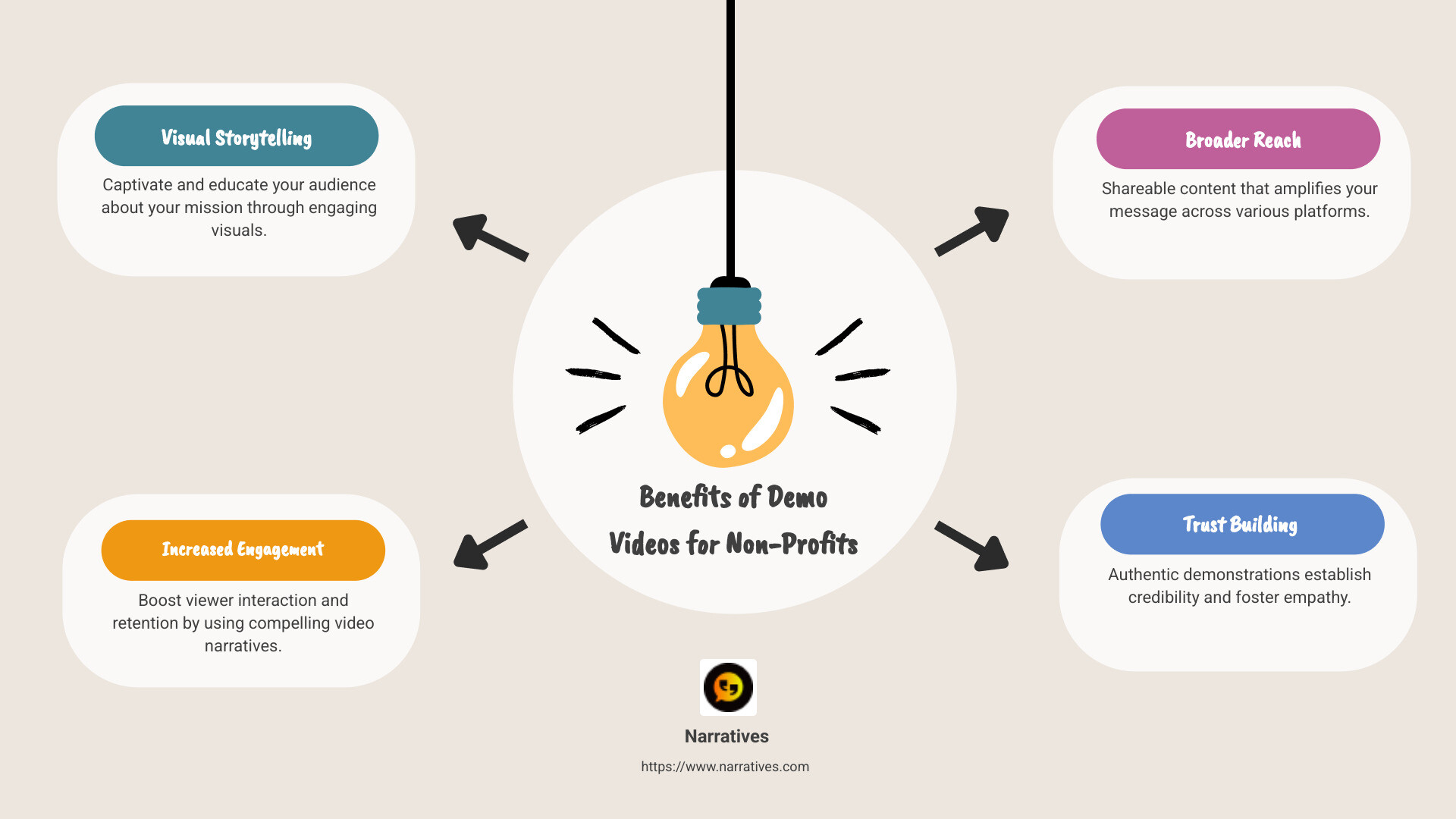
- Benefits of Demo Videos for Non-Profits:
- Visual Storytelling: Captivate and educate your audience about your mission.
- Increased Engagement: Videos can boost viewer interaction and retention.
- Broader Reach: Easily shareable across various platforms to amplify your message.
- Trust Building: Authentic demonstrations can establish credibility and empathy.
In the busy digital landscape, where attention spans are dwindling, utilizing the art of storytelling through video can significantly bolster the mission of social impact organizations. This format not only attracts viewers but also retains their attention long enough to instill a meaningful message.
Creating impactful demo videos doesn't have to be daunting. With the right approach, tools, and a focus on storytelling, non-profits can leverage video content to make a lasting impression and drive their mission forward.
Demo video creation terms at a glance:
Understanding Demo Video Creation
Demo video creation is an essential strategy for businesses and organizations seeking to highlight the unique features and benefits of their products or services. These videos serve as more than just a visual aid; they are a dynamic way to tell your product's story, demonstrate its value, and engage potential customers.
What is Demo Video Creation?
Demo video creation involves producing a video that showcases a product in action. This type of video is one of the most popular instructional formats because it provides a clear and concise way to show how a product works. The goal is to visually communicate the product's features and benefits, making it easier for potential customers to understand its value.
Why Are Demo Videos Effective?
Visual Learning: People often find it easier to understand complex information when it's presented visually. Demo videos cater to this by offering a step-by-step guide to using a product.
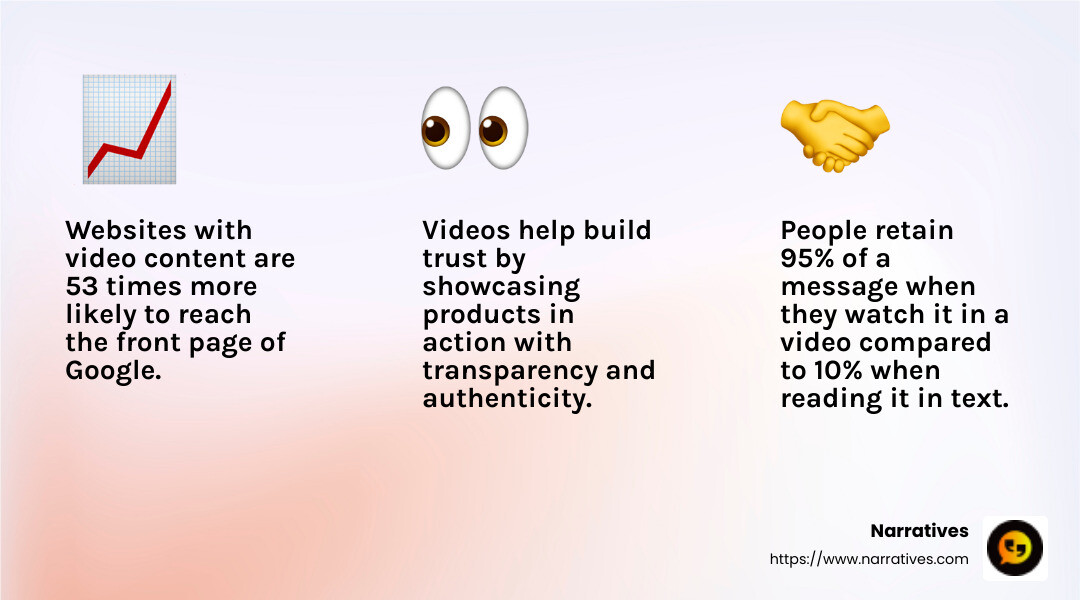
Builds Credibility: Demonstrating a product in action helps build trust with your audience. It shows transparency and authenticity, which can be crucial for newer or lesser-known products.
Increases Traffic: Websites with video content are significantly more likely to appear on the first page of Google search results. This increased visibility can drive more traffic to your site, as users tend to click on top search results.
Product Demo Video Examples
Tech Gadgets: Brands often use demo videos to showcase new features of gadgets, like smartphones or smart home devices. These videos highlight how the product integrates into daily life, making it relatable to potential buyers.
Software Applications: For software products, demo videos can walk users through the interface, showing how to steer and use key features. This approach is particularly effective in educating users and reducing the learning curve.
Non-Profit Initiatives: Non-profits can use demo videos to illustrate the impact of their programs. By showing real-life examples and testimonials, they can create an emotional connection with viewers, inspiring them to support the cause.
Key Elements of a Successful Demo Video
Clear Objective: Define what you want to achieve with the video. Is it to educate, inform, or persuade?
Engaging Script: The narrative should be compelling and easy to follow. A good script keeps the audience interested from start to finish.
High-Quality Visuals: Ensure your video is visually appealing. High-quality footage and graphics can significantly improve viewer experience.
Call to Action: End with a strong call to action, guiding viewers on what to do next, whether it's visiting a website, signing up for a newsletter, or making a purchase.
Incorporating these elements into your demo video creation process can help you craft videos that not only inform but also engage and convert your audience. In the next section, we'll explore best practices for creating impactful demo videos that resonate with viewers and drive results.
Best Practices for Creating Impactful Demo Videos
Creating a demo video that resonates with your audience isn't just about showcasing your product. It's about engaging content, interactive experiences, and leveraging modern technology like AI avatars. Let's explore how you can make your demo video creation process more impactful.
Engaging Content
The heart of any great demo video is its content. To captivate your audience, you need to craft a narrative that is both informative and entertaining. Start by understanding your audience's needs and pain points. Then, tailor your content to address these areas directly.
Tell a Story: Use storytelling techniques to guide your audience through your product's journey. This can make your video more relatable and memorable.
Keep it Concise: Attention spans are short. Aim to deliver your message in a clear and concise manner. Ideally, your video should be no longer than 2-3 minutes.
Visual Appeal: Incorporate high-quality visuals and graphics. Engaging visuals can hold viewers' attention and help convey complex information more effectively.
Interactive Demos
Interactive demos have become a game-changer in product marketing. They allow viewers to engage with your product in a hands-on manner, enhancing their understanding and retention.
Self-Paced Exploration: Let users interact with the demo at their own pace. This can be achieved through clickable elements or guided tours within the video.
Dynamic Features: Incorporate features like conditional branching, where viewers can choose their path based on their interests. This personalization can significantly boost engagement.
Feedback and Analytics: Use tools that provide insights into how viewers interact with your demo. This data can help you refine your approach and improve future content.
AI Avatars
Leveraging AI avatars in your demo videos can add a modern touch and improve user engagement. These digital personas can narrate your video, making the content more dynamic and relatable.
Personalized Narration: Use AI avatars to deliver personalized messages to different audience segments. This can make your content feel more custom and relevant.
Multilingual Capabilities: AI avatars can help you reach a global audience by delivering content in multiple languages. This expands your reach and makes your product accessible to a diverse audience.
Consistency and Efficiency: AI avatars ensure consistent delivery of your message, reducing the need for multiple takes and extensive editing.

By focusing on these best practices, you can create demo videos that not only showcase your product but also engage and convert your audience. In the next section, we'll dive into the top tools you can use for demo video creation, ensuring a smooth and professional production process.
Top Tools for Demo Video Creation
Creating impactful demo videos requires the right tools. Let's explore some top options that can make your demo video creation process smoother and more effective.
Loom
Loom is a standout choice for demo video creation. It allows you to record your screen and yourself simultaneously, making it perfect for personal and engaging demos. One of its key features is the AI add-on, which can remove filler words and assign action steps, helping you save time on editing. Loom also offers easy sharing options, allowing you to quickly distribute your videos via email or social media.
Key Features:
- Simultaneous screen and webcam recording
- AI-powered editing tools
- Easy video sharing
Pricing: Loom offers a free version, making it accessible for any budget.
Vyond
Vyond is ideal for those looking to add animated elements to their demo videos. This tool lets you create dynamic, engaging content with customizable characters and scenes. It's perfect for storytelling, helping you create a narrative that resonates with your audience.
Key Features:
- Customizable animations and characters
- Scene-building tools
- Robust library of assets
Pricing: Vyond requires a subscription, with various plans available based on your needs.
Saleo
Saleo is designed for live demo recordings, capturing essential moments during your presentations. While it excels in live settings, it may not have all the features needed for asynchronous solutions. However, it offers tools to keep your demos organized, like folders and libraries.
Key Features:
- Live demo recording
- Organizational tools
- Real-time data insights
Pricing: Saleo does not offer a free plan. Contact their sales team for custom pricing.
Google Meet
For one-time, personalized connections, Google Meet is a great option. It allows you to share your screen and demo your product in real-time. While it may not be the best for scaling, its integration with other Google tools makes it convenient for quick meetings and presentations.
Key Features:
- Screen sharing and recording
- Integration with Google Workspace
- Automatic calendar scheduling
Pricing: Google Meet is free, with additional features available through Google Workspace upgrades.
Reprise
Reprise is custom for advanced users who need robust editing tools. It allows you to create detailed demo videos with sections and menus for easy navigation. While it lacks collaboration features, its analytics tools help you measure your demo's effectiveness.
Key Features:
- Advanced editing tools
- Premium analytics
- Global replacements for content
Pricing: Reprise offers custom plans. A consultation is required to get started.
These tools provide a range of features to suit different needs and budgets. Whether you're looking for simplicity, animation, or advanced editing, there's a tool to help you create compelling demo videos. In the next section, we'll guide you through the step-by-step process of demo video creation, ensuring you make the most of these powerful tools.
Step-by-Step Guide to Demo Video Creation
Creating a compelling demo video can seem daunting, but breaking it down into manageable steps makes the process straightforward. Let's explore the key stages: recording, editing, and sharing.
Recording
The first step in demo video creation is capturing your content. Whether you're showcasing software or a physical product, the recording process is crucial.
Choose the Right Tool: Select a tool that suits your needs. For screen recordings, software like Camtasia allows you to capture both your screen and audio. If you're demonstrating a physical product, a good quality camera will be necessary.
Prepare Your Content: Before hitting record, plan your script and practice your demonstration. This ensures a smooth recording session. If you're using a tool like Camtasia, you can even use pre-made templates to streamline your process.
Set Up Your Recording Environment: Ensure your recording space is quiet and free from distractions. If capturing system audio, remember to mute any notifications to avoid interruptions.
Record Your Demo: Once everything is set, start recording. Don't worry about making mistakes; you can always edit later. Aim for clarity and engagement, showing your product's key features and benefits.
Editing
Editing transforms your raw footage into a polished, professional video. Here's how to make your demo shine:
Use an Intuitive Editor: Platforms like Camtasia offer user-friendly editors with drag-and-drop functionality, making it easy to trim unwanted sections and add improvements.
Improve with Effects: Add captions, background music, or voiceovers to make your video more engaging. But remember, simplicity is key. Too many effects can distract from your main message.
Review Your Work: Watch your edited video several times to ensure it flows well and effectively communicates your product's value. Make any necessary adjustments for clarity and impact.
Sharing
Once your video is ready, it's time to share it with your audience. Here's how to do it effectively:
Choose the Right Platforms: Consider where your audience spends their time. Social media, email, and your company's website are great places to start. For broader reach, platforms like YouTube can help.
Optimize for SEO: When uploading your video, use relevant keywords in the title, description, and tags. This helps improve your video's visibility and reach.
Leverage Analytics: Once your video is live, use analytics tools to track its performance. Understanding viewer engagement can provide insights for future improvements.
By following these steps, you can create impactful demo videos that showcase your product effectively. Next, we'll tackle some frequently asked questions about demo video creation to help you refine your process even further.
Frequently Asked Questions about Demo Video Creation
How do you make a good product demo video?
Creating a good product demo video involves three key components: recording, sharing, and communicating.
Recording: Start with a clear plan. Outline what you want to show and say. Use a reliable screen recording tool to capture your content. For instance, Narratives offers a robust solution that allows you to record your screen and yourself simultaneously, making the video more engaging.
Sharing: Once your video is ready, make sure it's easy to share. Platforms like Narratives offer quick sharing options, letting you distribute your video via links, email, or social media in seconds.
Communicating: Ensure your message is clear and concise. Highlight the key features of your product and demonstrate how it solves a problem for your audience. Use visuals and voiceovers to make your points more compelling.
How long should product demo videos be?
The ideal length of a demo video depends on its purpose and where it fits in the sales funnel.
Top of the Funnel: If your video is meant to attract new leads, keep it short and engaging—around 1 to 2 minutes. This is enough time to pique interest without overwhelming viewers.
Middle of the Funnel: For prospects who are already interested, a more detailed video of 3 to 5 minutes might be necessary to explain features and benefits more thoroughly.
Bottom of the Funnel: When your audience is close to making a purchase decision, they might appreciate a deeper dive. Here, a video of up to 10 minutes can be appropriate, as long as it remains engaging and informative.
What is the best tool to record a demo?
Choosing the right tool for screen recording is crucial for creating high-quality demo videos. Narratives is often recommended due to its ease of use and robust features. It allows simultaneous recording of your screen and webcam, making it ideal for personal and engaging demos.
Narratives also offers features like AI-powered editing, which can automatically remove filler words and suggest action steps, saving you time in post-production. This tool is especially useful for teams, as it allows for easy collaboration and feedback through comments and annotations.
By selecting the right tool and following best practices, you can create effective demo videos that captivate your audience and drive engagement.
Conclusion
At Narratives, we believe in the power of digital storytelling to transform how non-profits and purpose-driven organizations communicate their impact. Through engaging and emotionally resonant demo videos, we help these organizations lift underrepresented voices and share their stories in a way that inspires action and builds trust.
Social impact is at the core of what we do. By crafting high-quality video content, we support non-profits in increasing their visibility and connecting with their communities. These demo videos are not just marketing tools; they are stories that highlight the challenges and triumphs of those working tirelessly to make the world a better place.
Our commitment is to provide the tools and expertise needed to create compelling demo videos that resonate with audiences and drive meaningful change. Whether you are a non-profit looking to share your mission or a purpose-driven organization aiming to amplify your impact, we are here to be your digital storytelling partner.
Learn more about how Narratives can help you tell your story and make a difference. Find our services.
.avif)